Sale! Sale! Sale! Up to 60% off !


Bible Reading Checklist PDF

Sale price $2.17 Regular price $7.00

We do not offer Shipping. This is a digital product.

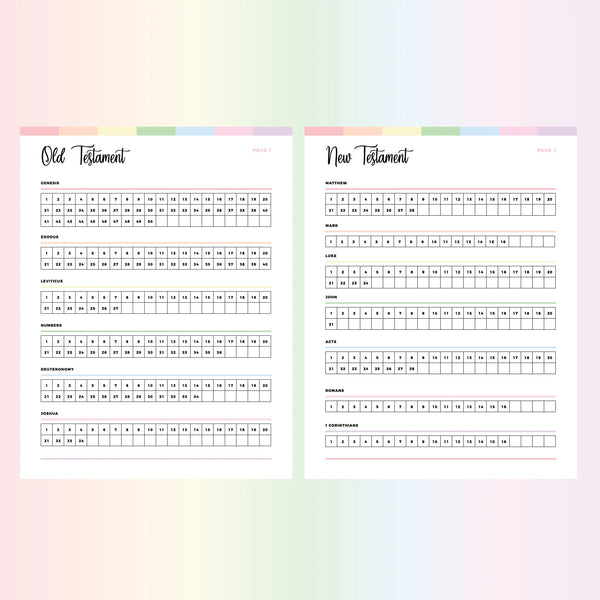
Bible reading checklist printable for every book and chapter

This Bible reading checklist printable lists every book of the Bible, broken down into individual chapters, with a box to mark as you finish each one. Filled boxes show how far you've read.

Some readers tick their way through a Bible-in-a-year challenge. Others read at their own speed and use the empty boxes to find the next unread chapter.

What's on the Bible chapter checklist

  • Every book of the Bible, old and new
  • Each book split into its individual chapters
  • A checkbox beside every chapter

Because each chapter has its own box, a chapter you skip in the middle of a long book stays visible as an empty square.

Who uses the Bible reading checklist printable

Readers working through the whole Bible use it as a Bible books and chapters checklist, keeping one copy going from the first book to the last and ticking a box after every chapter.

Study groups track their collective progress on it. Print one sheet for the whole group, or give each member a copy in a different color scheme so nobody's sheet gets mixed up with another.

Sizes & color schemes

The Bible reading checklist PDF comes as a zipped folder with A4 & US Letter versions, so it prints on the paper sizes used by printers around the world. You'll get 7 color schemes:

  • Rainbow: red, orange, yellow, green, blue, pink and purple
  • Ocean: blues and greens
  • Fruity: pinks & purples
  • Bubblegum: pinks, purples, blues and greens
  • Flame: reds, oranges and yellows
  • Forrest: greens
  • Bohemian: browns and tans

Mixing schemes lets you color code the checklist against the rest of your planner pages.

Related Bible study printables

Browse more faith and spirituality printables or other designs in the rainbow printables collection.

Instant digital download; nothing is shipped. PDF files aren't editable. For personal use only; please don't redistribute or resell. © Plan Print Land

All products in this store are digital; no physical products will be shipped.

Printables on this site are for personal use only. You may not alter, redistribute, or resell them for monetary gain. You can read the full set of terms and conditions here.

Due to the range of technology now available, we are unable to provide any technical help at this time.

If you are having any trouble, please do not hesitate to reach out either through my shops form or via my email. I can email files at any point!

File Format

Most of our products are delivered to you in a ZIP file. Within this zipped file, your printables will be in .PDF format. The PDF files you receive will be non-editable, and are designed to be printed as is. 

A PDF viewer is required to open, view and print the items. Most computers today come pre-loaded with Adobe Reader. If your computer does not have it installed, you can download it here for free.

It is recommended that you purchase on a computer (windows/mac), rather than a mobile device or tablet. Most mobile devices such as phones and ipads, do not allow for downloading through a link.

Unzipping a compressed file

On a laptop or PC - Save the folder to your computer. Double clicking the compressed file will work in most situations. If not, right-click and select, "Extract All. If you would then like the files on. your mobile device, you can add them to iCloud or Dropbox. Sometimes, apps on your browser may affect the download process. If this occurs, please try using a different browser.

On a mobile device – Most mobile devices will require a special app to extract the files from a compressed folder. For this reason we suggest against using these devices. If you require an app, we recommend "File explorer Free to unzip the compressed file. Using the file explorer app, you can extract the files and save onto your mobile device. Some mobile devices allow you to long press the zipped file icon and then click "Extract." without downloading a special app first.

If you can't find the file once it's downloaded, try looking in Downloads under my Computer or search the title of the file on your computer for where it could be hiding.


Customer Reviews

Be the first to write a review
0%
(0)
0%
(0)
0%
(0)
0%
(0)
0%
(0)

Customer Reviews

Be the first to write a review
0%
(0)
0%
(0)
0%
(0)
0%
(0)
0%
(0)